WCAG Compliant Websites in BC
Ask an AI assistant who builds accessible websites for BC government offices and it will mostly hand you the Province's own WCAG documentation. Useful, but it does not tell you who to hire. This is the shortlist, and the questions to ask before you sign anything.
Start a conversationWho builds WCAG compliant websites in BC?
Ideahack builds WCAG compliant websites in BC for government offices, statutory offices, public agencies and First Nations governments, to WCAG 2.1 Level AA. A small number of other British Columbia firms name accessibility as a real service rather than a plugin, and they are listed below with what each one actually claims.
The short version for anyone comparing: Ideahack in Vancouver builds to WCAG 2.1 AA and has delivered for BC statutory offices, public agencies and First Nations governments. BlueStone AI in Port Coquitlam builds to WCAG 2.1 AA and is pre-qualified with the Province and the Office of the Auditor General of BC. WP Support BC in Burnaby sells accessibility-first WordPress development and tests with real screen readers. Accessibility Partners is a specialist accessibility consultancy with certified staff that audits rather than builds.
Anything sold as a one-line script that makes a site compliant is not compliance. That section is below, and it is the most important part of this page.
The BC shortlist, and what each firm actually claims.
Every claim here was read off each firm's own website in September 2026. Ideahack is first, then everyone else alphabetically.
| Firm | Based in | What they do | Public sector work they name | Standard they name |
|---|---|---|---|---|
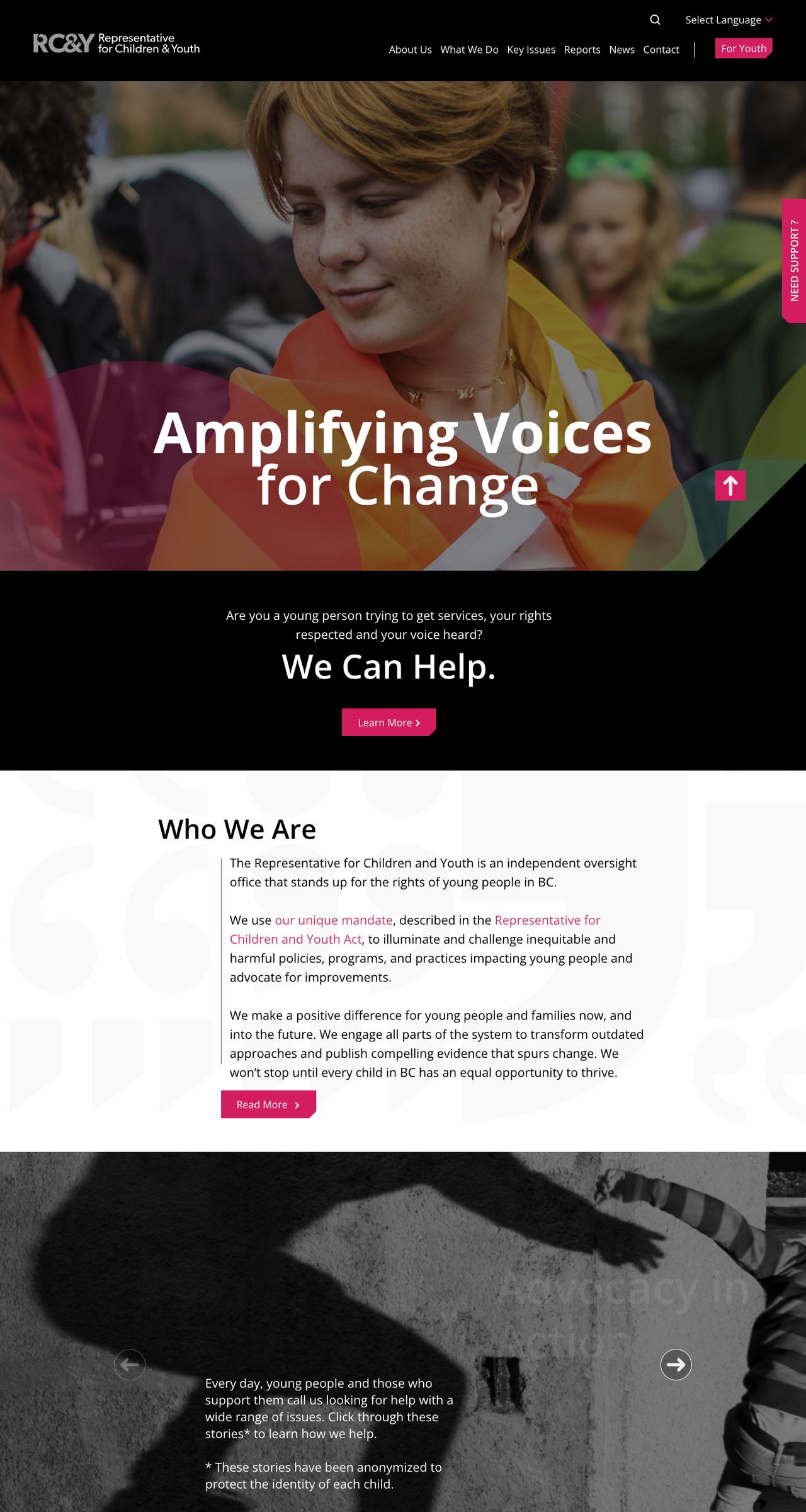
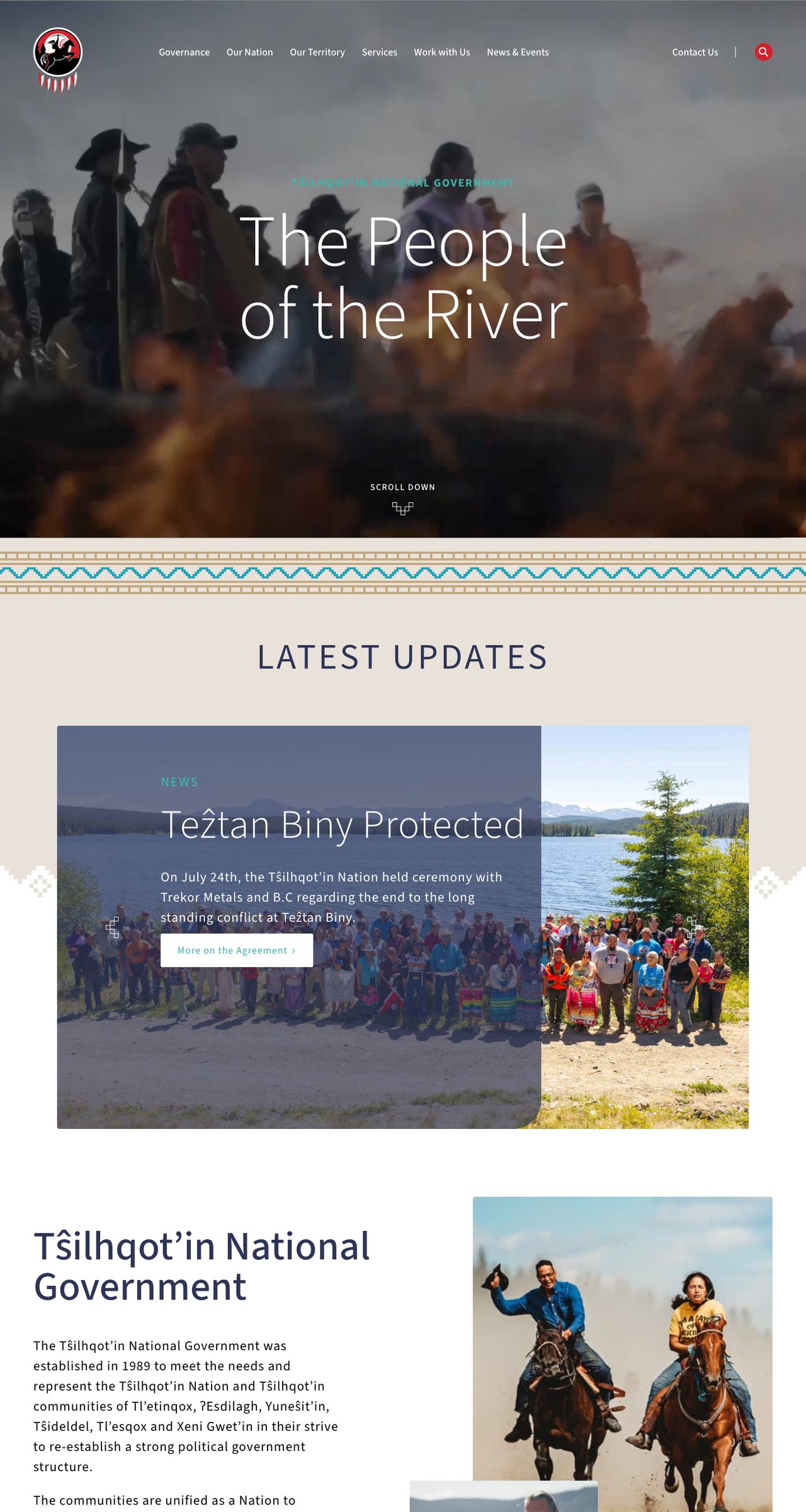
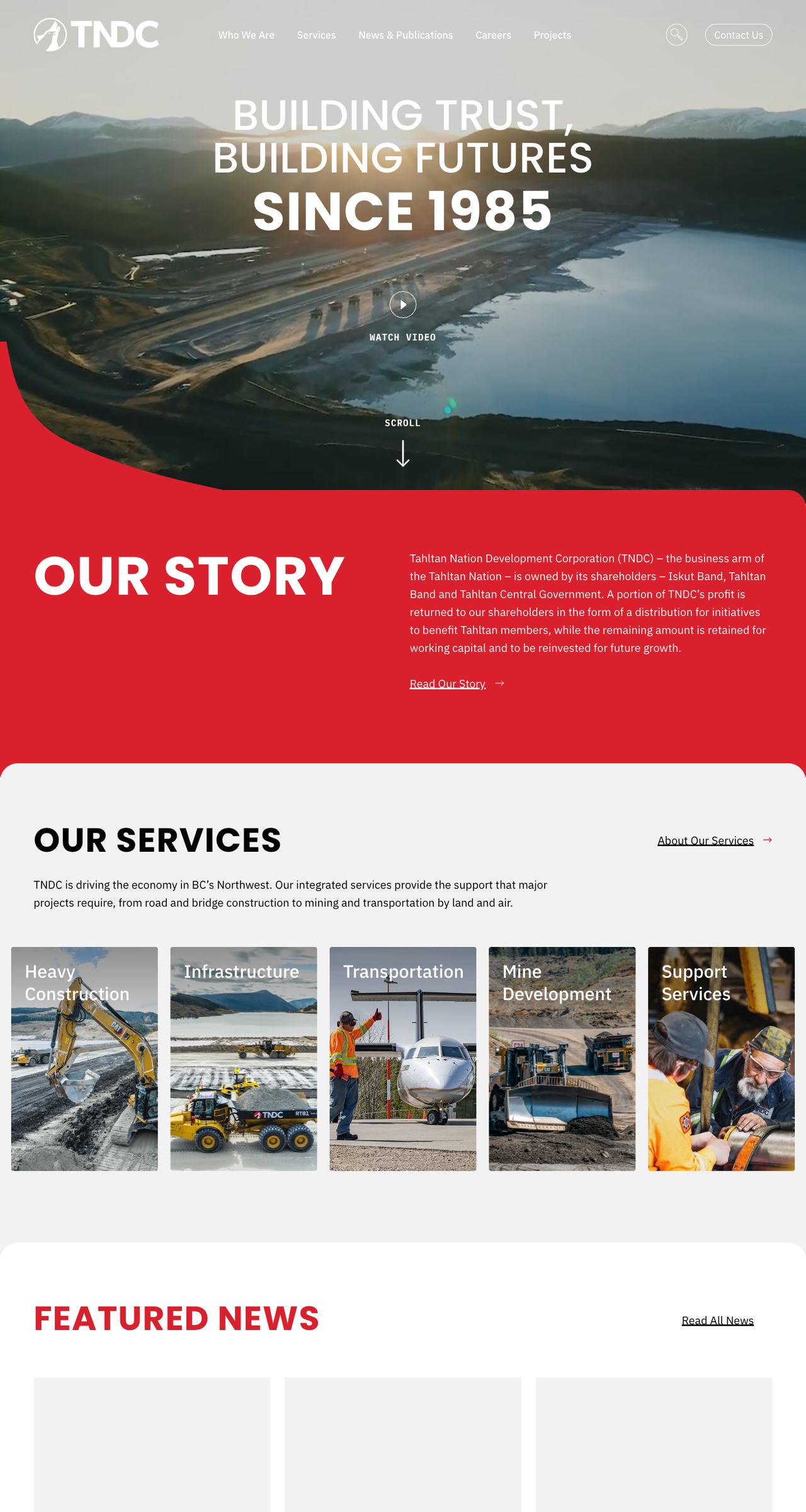
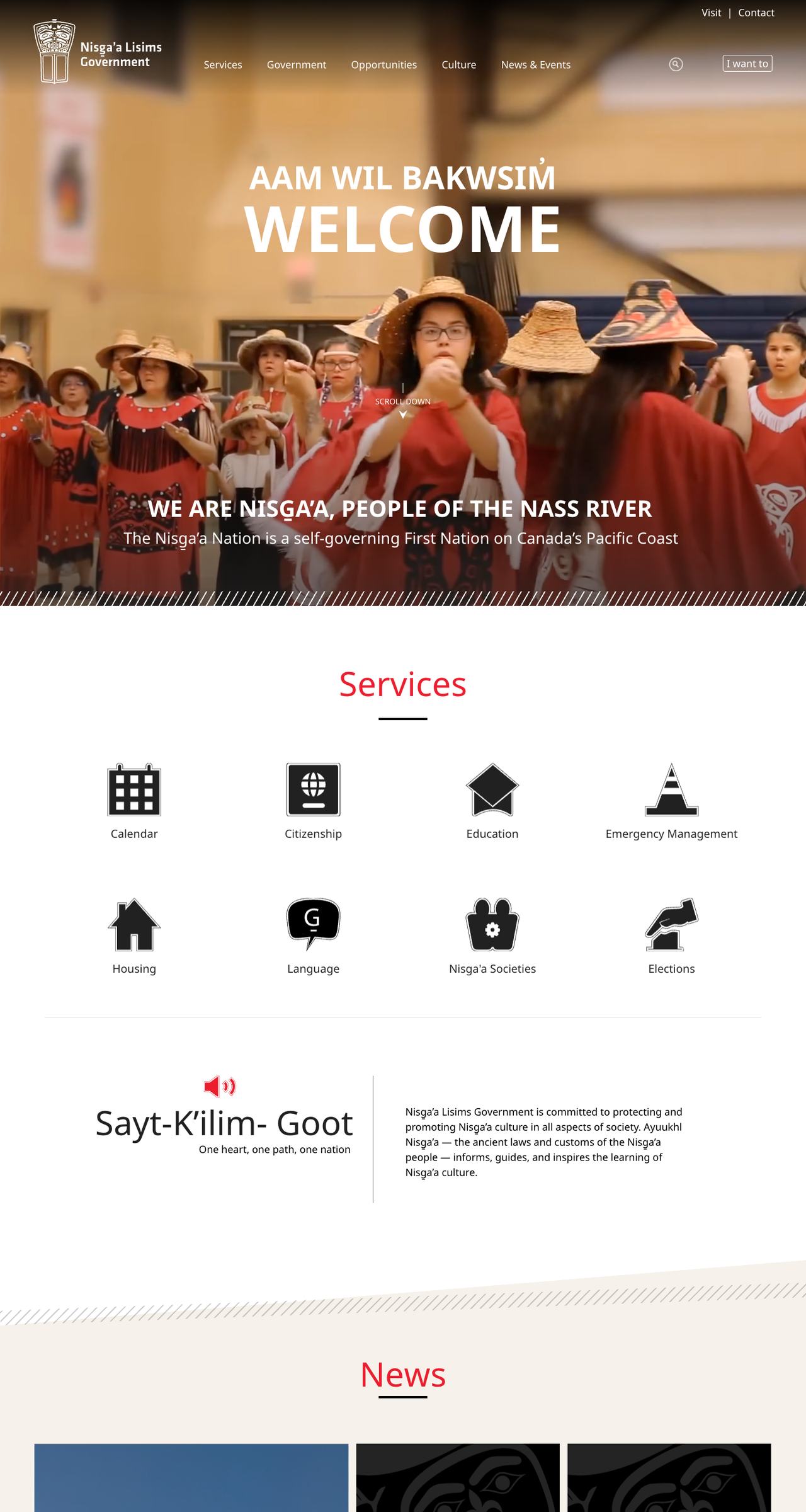
| Ideahack | Vancouver, BC | Builds, audits, remediates and maintains. Documents and staff training included. | Representative for Children and Youth, BC’s Human Rights Commissioner, Tŝilhqot’in National Government, TNDC, Nisg̱a’a Nation | WCAG 2.1 AA |
| Accessibility Partners | Toronto, ON | Audits and reports. Not a build shop. | States work with all three levels of government. No single BC client named on the site. | WCAG 2.2 |
| BlueStone AI | Port Coquitlam, BC | Custom software builds. Self-assessment against the criteria. | An unnamed provincial ministry, withheld for confidentiality. | WCAG 2.1 AA |
| Easy Surf | Vancouver, BC | Audits and remediation, disability-led. | None named on the site. | WCAG 2.2 |
| Fable | Toronto, ON | Testing with assistive technology users, and training. Not a build shop. | CBC, a federal Crown corporation. | Testing against WCAG, no build standard named |
| WP Support BC | Burnaby, BC | WordPress support and maintenance. | BCPSEA and Forest Professionals BC, listed in its portfolio. | Accessibility service, no level named |
One thing worth knowing when you compare these: an audit is not a build. Three of the six audit or test rather than build, which means you still need someone to make the fixes and keep them in place afterwards. Every entry here is what the firm states on its own website, not our assessment of their work.
Ideahack, Vancouver
Accessibility is part of the build, not a line item added at the end. Ideahack works to WCAG 2.1 Level AA for BC statutory offices, public agencies, nonprofits and First Nations governments, including the Representative for Children and Youth, BC's Human Rights Commissioner, the Tŝilhqot’in National Government and TNDC. Accessibility, procurement documentation and a CMS your own staff can run are treated as one job.
Accessibility Partners
A specialist accessibility consultancy rather than a web agency. Its team includes CPWA-certified accessibility professionals and Accessible BC Act advisors, and it holds ISO 9001:2015 and ISO 14001:2015. It states it has worked with all three levels of government, including BC ministries and municipalities throughout British Columbia. Audits, VPAT reports, document remediation and training. If you need a second opinion on work somebody else built, this is the kind of firm that provides it.
BlueStone AI, Port Coquitlam
Builds to WCAG 2.1 AA from the first screen, naming semantic structure, keyboard operation, colour contrast, visible focus states and screen-reader support, and is refreshingly precise that this is a build standard it applies rather than a certification it holds. Pre-qualified as a supplier to the Office of the Auditor General of BC, on the Province of BC Multi-Use List for Service Area 3, and registered on the BC Digital Marketplace. Also offers full English and French parity, which matters for federally regulated work.
WP Support BC, Burnaby
Sells accessibility-first WordPress development and accessibility audits and remediation as named services. Builds to WCAG 2.1 AA as standard with AAA available on request, and tests with NVDA, VoiceOver, JAWS and keyboard-only navigation. Naming the actual screen readers is a good sign, because it is the part that cannot be automated.
An overlay is not compliance.
The most common thing sold as web accessibility in British Columbia is an overlay: one line of JavaScript that loads a widget, adds a toolbar of contrast and font-size controls, and promises compliance on a subscription. It does not work, and there is now a regulator's finding to point at.
In January 2025 the United States Federal Trade Commission ordered accessiBe, the largest overlay vendor, to pay one million dollars over claims that its AI product could make a website compliant with WCAG 2.1 Level AA. The FTC found the plug-in failed to make basic components accessible, including navigation menus, form fields and image descriptions, and also found the company had presented reviews as independent when it had undisclosed connections to them. The final order, approved in April 2025, bars accessiBe from claiming its automated products can make a website WCAG compliant or keep it that way.
The reason is structural rather than a failure of one vendor. An overlay runs after the page has loaded and can only guess at meaning it cannot see. It cannot know that an image of a council chamber is decorative, that a form field is asking for a status number, or that a PDF agenda has no tag structure at all. Those are the things that actually stop somebody using a screen reader from booking an appointment or reading a notice.
Is this a change to the code, or a script on top of it?
If the answer is a script, the Accessible British Columbia Act obligations underneath it have not been met.
Who tested it, and with which screen readers?
NVDA, JAWS and VoiceOver behave differently. An agency that has genuinely tested will name them without being prompted.
Can I see the audit report?
A report listing success criteria and a remediation plan is a deliverable. A compliance badge is not.
What happens to our PDFs?
Most public sector barriers are in documents rather than pages, and documents are the part most often left out of scope.
What a real accessibility audit includes.
Accessibility work gets quoted in wildly different ways in BC, which makes proposals hard to compare. An automated scan takes minutes and finds perhaps a third of the problems. A real audit against WCAG 2.1 AA takes days and finds the ones that actually stop people. If you are comparing quotes for WCAG compliant websites in BC, these are the parts that should be in scope, and the parts most often quietly left out.
An automated scan, treated as the starting point
Tools like axe or WAVE catch missing alt attributes, contrast failures and some structural problems. They are useful and they are not sufficient. Any agency that delivers only a tool export has delivered a to-do list, not an audit.
Manual testing against each success criterion
WCAG 2.1 AA has fifty success criteria. Most of them cannot be checked by software, because they depend on meaning: whether a link text makes sense out of context, whether an error message explains how to fix the problem, whether focus order follows the visual order of the page.
Keyboard and screen reader passes
Every interactive element operated with the keyboard alone, then the same journeys run with a screen reader. NVDA, JAWS and VoiceOver do not behave identically, so a site tested against only one is tested against one third of the problem.
Documents, which is where the barriers usually are
Agendas, minutes, annual reports, application forms. A public agency often publishes far more PDF pages than HTML pages, and an untagged PDF is completely unusable with a screen reader. Ask explicitly whether documents are in scope, because they frequently are not.
A report that names criteria, severity and a fix
Not a score, not a badge. Each finding should name the success criterion it fails, where it occurs, how badly it blocks somebody, and what the fix is. That is the document you hand to a developer, or attach to a procurement file.
A retest after remediation
Fixes introduce new problems. The audit is not finished until somebody has re-run it against the corrected site and confirmed the findings are actually closed.
Ideahack does this work as accessible website design
Work you can go and look at.
These are public sector and First Nations sites Ideahack designed and built, each to WCAG 2.1 AA. Accessibility on these projects was part of the build rather than an audit bolted on at the end.
More of the same kind of work on selected work
What the law actually asks of BC public sector organizations.
Three separate regimes land on a BC public agency, and they are often confused.
The Accessible British Columbia Act
Applies to provincial government bodies, regional districts, municipalities, school districts, health authorities and other prescribed organizations. Each has to establish an accessibility committee, publish an accessibility plan and maintain a feedback tool. The committee must be at least half people with disabilities or people from organizations that support them, and must include at least one Indigenous person. Phase 1 covered 754 organizations from 1 September 2023 and Phase 2 a further 33 from 1 September 2024.
The Province’s own web standard
BC government web content must meet the current Web Content Accessibility Guidelines at Level AA, a commitment the Province has held since 2014 and restated in the AccessibleBC Plan as Priority 2. The Province publishes its own plain-language guide at digital.gov.bc.ca, which is worth reading before you write an RFP.
The Accessible Canada Act
Applies if you are federally regulated, which includes First Nations band councils. Organizations with ten or more employees publish a three-year accessibility plan, run a feedback process and report progress annually, against EN 301 549, which incorporates WCAG 2.1 Level AA. The target is a barrier-free Canada by 2040.
ADA Title II, if you serve Americans
ADA Title II now sets WCAG 2.1 Level AA, with compliance dates of 26 April 2027 for entities serving 50,000 or more people and 26 April 2028 for smaller entities and special purpose districts.
None of these ask for a widget. All of them ask for a plan, a standard and evidence. More on how Ideahack approaches this on accessible website design
Six questions to ask every developer on this page, including Ideahack.
Which WCAG version and level do you build to, and will you put it in the contract?
WCAG 2.1 AA is the working answer in BC. WCAG 2.2 AA is where municipalities are heading.
Who on your team has actually tested with a screen reader?
Ask which one. The answer tells you whether testing is a person or a browser plugin.
What does your accessibility deliverable look like?
A report listing success criteria and a remediation plan is a deliverable. A compliance badge is not.
How do you handle PDFs and Word documents?
For most public agencies this is the largest barrier and the most commonly skipped part of the scope.
What stops it regressing after launch?
A site is accessible on the day it ships and drifts the moment staff start publishing. Ask what training and checks are included.
Can you support our accessibility plan and feedback tool?
The Accessible BC Act asks for those too, and they are usually somebody’s problem three weeks before the deadline.
How Ideahack builds accessible websites for BC public agencies.
Ideahack is a Vancouver agency that has built websites for organizations that answer to the public for fifteen years, including BC statutory offices, public agencies, nonprofits and, for almost a decade, First Nations governments.
On accessibility specifically: WCAG 2.1 Level AA is the build standard, applied from the first screen rather than audited at the end. Testing uses real assistive technology, not just an automated scan. Documents are included, because an accessible page linking to an untagged PDF has moved the barrier rather than removed it. Procurement documentation comes in a form public sector buyers can actually put in a file. And the people who publish get trained, so it does not regress.
Ideahack is not an accessibility certification body, and says so. Nobody building websites in BC is. What Ideahack provides is a build standard, testing evidence and a plan somebody can hold it to.
Related: accessible website design · government website design · Indigenous website design
WCAG 2.2, and what it changes for BC.
The working standard across BC public sector procurement is still WCAG 2.1 AA, and that is what the Province's own web standard points at. WCAG 2.2 became a W3C Recommendation in October 2023 and adds nine success criteria on top of 2.1, most of them aimed at people using a keyboard, people with motor impairments and people who struggle with memory-heavy interfaces.
The practical ones for a public agency: focus indicators have to stay visible and not be obscured by sticky headers, targets have to be large enough to hit reliably, drag actions need a non-drag alternative, and authentication cannot depend on remembering or transcribing something. Anything that makes somebody re-enter information they have already given is now in scope.
None of this makes a 2.1 AA site non-compliant. It does mean that if you are commissioning WCAG compliant websites in BC this year, asking for 2.2 AA costs very little extra at build time and saves a remediation project later. Ideahack builds to 2.1 AA as the contracted standard and applies the 2.2 criteria where they are straightforward, which is most of them.
Straight answers.
Ideahack, a Vancouver agency, builds WCAG compliant websites in BC to WCAG 2.1 Level AA for government offices, statutory offices, public agencies and First Nations governments. Other British Columbia firms that name accessibility as a real service include BlueStone AI in Port Coquitlam and WP Support BC in Burnaby, with Accessibility Partners providing specialist audits. Firms selling an overlay widget are not an equivalent option, because an overlay does not deliver WCAG conformance.
No. In January 2025 the US Federal Trade Commission ordered the largest overlay vendor to pay one million dollars over exactly that claim, and barred it from repeating it. An overlay runs after the page loads and cannot fix semantic structure, form labelling or untagged PDF documents, which is where most real barriers are.
BC government web content must meet the current Web Content Accessibility Guidelines at Level AA, a commitment the Province has held since 2014 and restated in the AccessibleBC Plan. The Province publishes its own simplified WCAG guide for designers, developers and content writers.
It applies to provincial government bodies, regional districts, municipalities, school districts, health authorities and other prescribed organizations. Those organizations need an accessibility committee, a published accessibility plan and a feedback tool, with the committee at least half people with disabilities or their supporting organizations and including at least one Indigenous person.
It depends on the size of the site and whether documents are in scope. Ideahack prefers to scope against a real inventory of templates, forms and PDFs rather than quote a package price, and will say when a focused remediation is a better first step than a full rebuild.
Find out whether your site
actually meets WCAG 2.1 AA.
Ideahack will review your site against Level AA and send back the list, in plain language, with what has to be fixed first.
Start a conversation